Customers using the contact support buttons at the foot of the support pages, or the "email us" links in support Virtual Agent, are unable to open the Help Pane. Some users may not be able to empty their Deleted Items folder. Some users may not be able to see the left folder pane. While we fix the problem, you can send the file as a OneDrive link.
This issue has been fixed for Outlook.com country domains. If you used the workaround below you can now switch from using an Outlook.com alias to your country's domain. The root cause has been isolated to a bug introduced in build 8962, which was partially reverted, and further mitigation efforts are ongoing.
Top 7 Common Outlook Issues and Their Solutions
We will ensure that all information is retained and only contacts with matching information in all fields will be cleaned up. To check if you have received the fix, review your contact list to confirm duplicates have been removed. To help you get rid of these duplicates, we have released a fix which will automatically clean up your contact list.
What is the best way to troubleshoot Outlook issues?
Start classic Outlook in safe modeIn Windows 10, click Start.Type Outlook /safe, in the Search programs and files and then click OK.Close and re-open Outlook.If the issue is resolved, you can keep working, or if you have time, take the following steps to find out what COM Add-in is causing the problem.
Inbox empty or not loading [WORKAROUND]
If you manually type in the secondary connected account email address in the "From" field, the email is sent as "On behalf of" your primary Outlook.com account. If you typically use Outlook 365 stuck on startup an Outlook.com account for email, this issue can occur if there are multiple aliases on the account and the 3rd party email address is the primary alias. This fix will also lead to a reduction in the total number of contacts on your contact list.
- Our relationship to the Microsoft Partner Network allows us to provide competitive pricing and authentic software and support, all with a much-needed human element.
- Customers with only a 3rd party email address set up as the username of their Microsoft Account will be asked to add a 1st party Microsoft alias to their account before accessing Outlook.com.
- After finishing one step, if it does not resolve the issue move on to the next.
- To help you get rid of these duplicates, we have released a fix which will automatically clean up your contact list.
- We're aware of an issue where some users see the error message "Your message can't be displayed right now".
- Step 1 - The hard limit of recipients for a single email message is 300.
Family Calendar not visible [WORKAROUND]

Many businesses depend on it to keep their operations running, and having it break is a nightmare that usually ends up costing lots of money and causing a lot of frustration. Fortunately, with the right Outlook troubleshooting strategies, many of the most common Outlook problems are quite straightforward to troubleshoot. Below, you will see some of the most common issues that users run into, and what the most efficient way to troubleshoot Outlook is.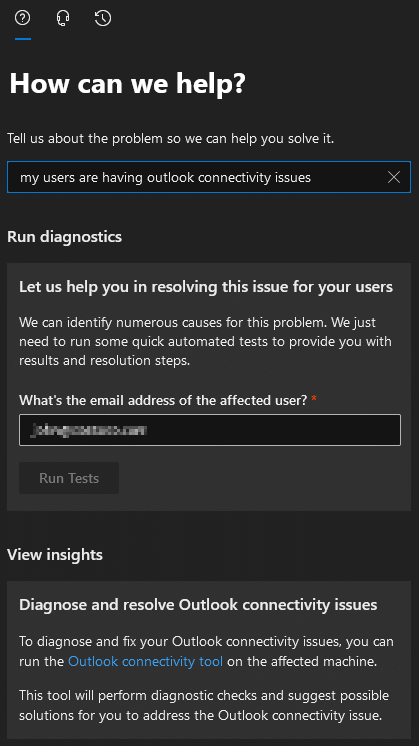
After sending an email, users get a non-delivery report with an error
Whether it’s restoring email from encrypted backups or recovering badly broken PSTs, Stellar gets the job done with minimal fuss. When built-in tools fall short, professional solutions pick up the slack. If you need to increase the number of this limit try the next resolution. Step 1 - The hard limit of recipients for a single email message is 300. Reduce the number of recipients for a single email to less than 300. If Outlook Desktop fails to connect, try these steps before escalating the issue to the ET&S Help Desk.
If you're having problems accessing Outlook.com, you can see the status of Microsoft Office Online Services at the Service Health portal.
It can automatically diagnose issues, troubleshoot, and fix problems with Outlook. Note that the above link is for desktop Outlook for Windows. A more general version that can also fix Office, Microsoft 365, and other Outlook problems can be found here. The same steps can also be used to check your junk mail filters in the new version of the desktop email client for Windows. In many organizations, Outlook is one of the most common and core programs that are used from day to day.
While built-in tools like ScanPST offer a basic Safety net, they often fall short when it comes to rectifying deeper file damage. In addition, you can export directly into Office 365 mailboxes after recovery with no middle step required. Using Cached Exchange Mode in complex environments can lead to painful sync delays. If a user has a large mailbox or lots of folder nesting, syncing might lag or even crash. Let’s look at what causes Outlook to crash, how you can fix it, and a smarter tool that takes a lot of the stress off your plate. It warns that once you pass certain limits such as the number of folders or messages, performance can nosedive.